TestLab Request
Manager
An internal Power Apps tool that replaced email-and-Teams chaos with a structured, automated request-and-approval workflow for Cybex's testing lab.
Turning ad-hoc email requests into a tracked, automated workflow.
The TestLab is an internal testing facility at Cybex GmbH. Before this app, requesting a test meant sending an email or a Teams message. There was no fixed format. Requests often lacked enough detail to act on, and neither side had a record to point back to later.
Any colleague can now submit a request through a guided wizard. The TestLab team gets a queue to claim and act on. Approvers get a dedicated review screen. Every status change and every document handoff sends an automatic notification, so nobody has to chase updates manually.
Requests often arrived with missing information. Tracking status meant re-asking over email or Teams.
A single guided wizard writes every request to one shared record. Role-based access controls who sees what, and automated workflows handle every notification.
Request status, approvals, and report handoff are now enforced by the app, not by whoever remembers to reply.
One wizard, tuned per department
Colleagues from any of Cybex's departments, from Engineering to Quality to Packaging, all submit through the same guided wizard. The fields it asks for adjust automatically to the department and request type, so a Compliance request and a Crash request collect exactly what each one needs, no more and no less. Nothing is saved until the final review step is confirmed, and that single validated submission hands off straight into the automated workflow below.
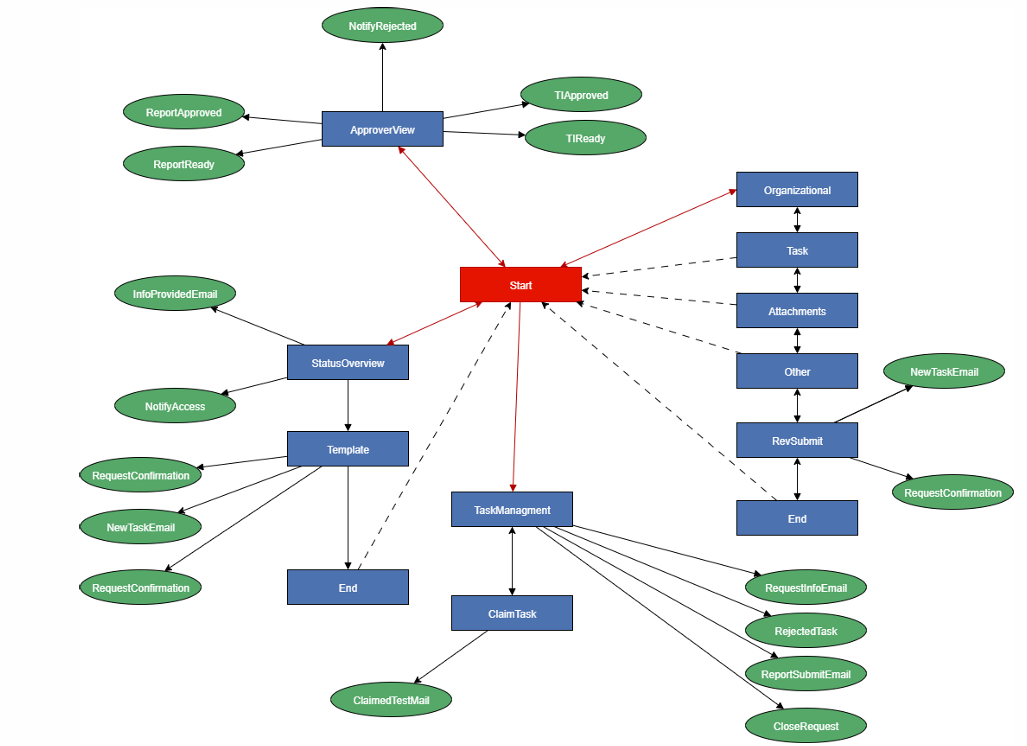
Automatic alert to the TestLab team
Info requests routed automatically
Approval or rejection notified instantly
Reason included every time
Request Wizard
A guided form walks each request through five short steps. Every step checks its own fields before the user can continue.
Role-Based Views
Each of the four roles, from requester to approver, only sees the screens and actions it's allowed to use.
Automated Notifications
Automated workflows cover every stage of a request, from submission to final approval. Nobody has to send a manual follow-up.
Approval Dashboard
Approvers review, approve, or reject submitted reports and test instructions from a single queue.